
Creating a Support Request (SR)
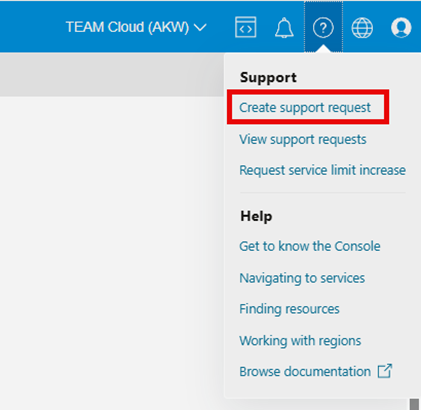
Visit the Support Center to browse and create support requests for technical and billing requests, including service limit increases. Open the Help menu and then select Create a Support request.
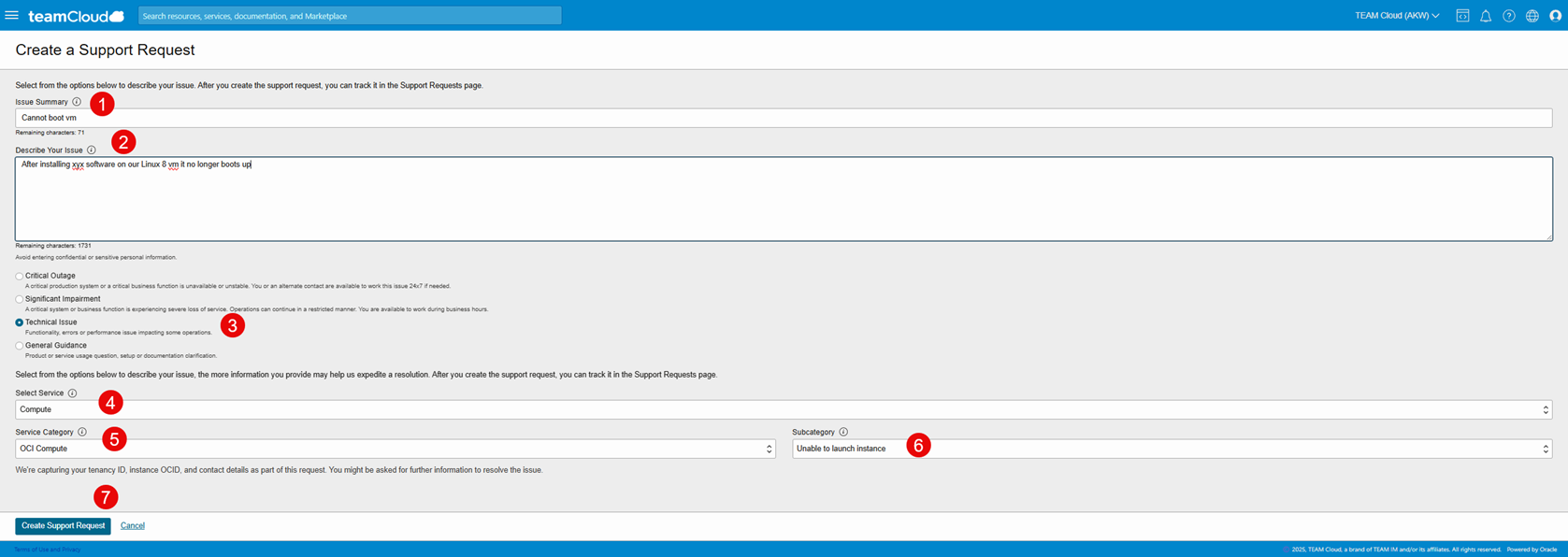
Provide an issue summary. Avoid inputting any confidential information.
Enter a brief description of your issue. Avoid entering any confidential or sensitive personal information. Include all the information that TEAM Cloud Support needs to route and respond to your request. Include troubleshooting steps taken and any available test results. You have the option to attach more detail in supporting documents after the Support Request (SR) is generated.
Select one of the severity levels for this request.
Select the Service best related to the issue you are experiencing from the drop-down menu.
Select the Service category of the service for which you are requesting support.
Select the Subcategory of the service for which you are requesting support.
Click Create Support Request
Request service limit increase
When you sign up for TEAM Cloud Infrastructure, a set of service limits is configured for your tenancy. The service limit is the quota or allowance set on a resource. For example, a tenancy is allotted a maximum number of compute instances per availability domain.
When you reach the service limit for a resource, you receive an error when you try to create a new resource of that type. You're then prompted to submit a request to increase the limit. You can't create
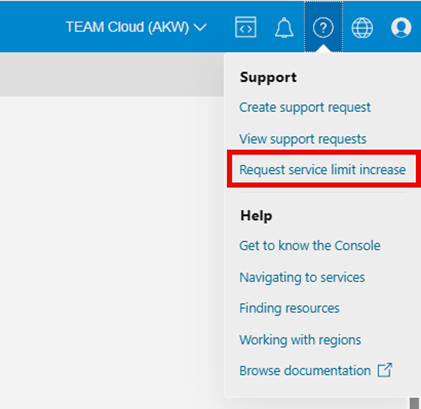
a new resource until you're granted an increase to the service limit, or you delete an existing resource. You can submit a request to increase your service limits from within the Console by clicking on the link under the help menu.
To list the limits details by each participating TEAM Cloud Infrastructure service please refer to this link .
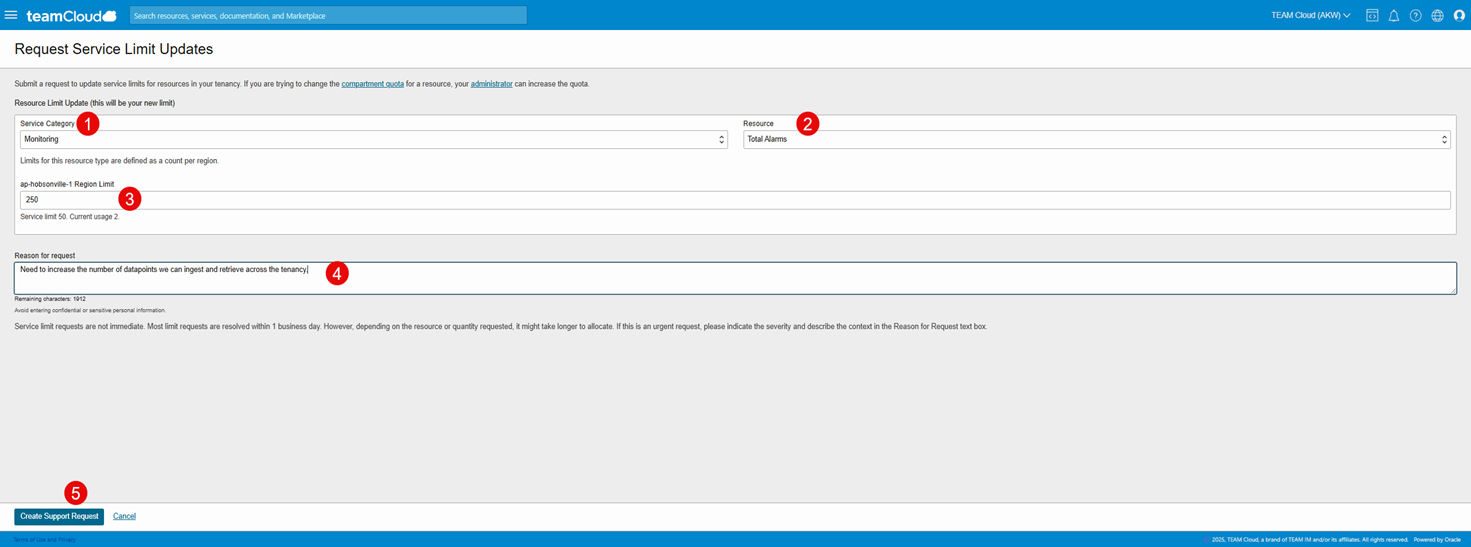
In the Request Service Limit Updates panel, enter the following under Resource Limit Update (this will be your new limit):
Service Category: Select the appropriate category from the drop-down list for the request. E.g. Monitoring
Resource: Select the appropriate resource E.g. Total Alarms
Depending on the resource you select, more fields might display for more specific information. In our example we select 250 Alarms
Reason for request: Enter a reason for the request. If the request is urgent or unusual, then provide details here. Avoid entering confidential information.
Click Create Support Request
Listing and Updating Support Requests (SR)
List support requests in Support Management by clicking on View support requests where you can get visibility into Technical & Billing Support Requests and Service Limit Updates.
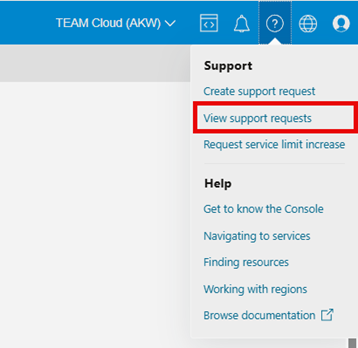
Select the link for the type of support requests that you want to list. You can select links for technical, billing, and service limit types of support requests.
The page for the selected link opens. All support requests of the indicated type are displayed in a table.
To filter the list of support requests, select a state or status on the left.
To search by support request number, enter the number in the search box on the upper right.

You can update support requests in the following ways:
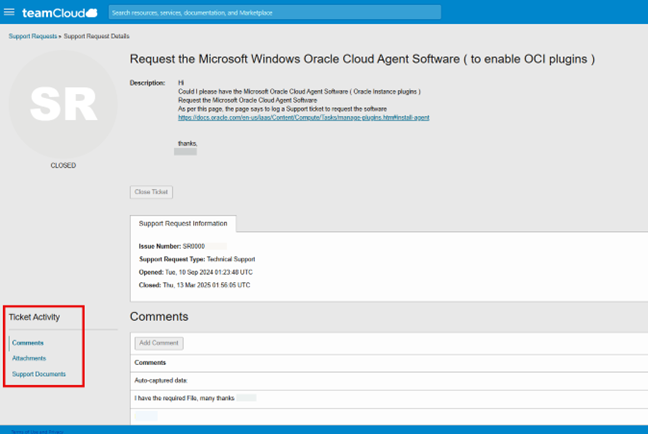
Adding a Comment to a Support Request
Attaching a File to a Technical Support Request
Closing a Support Request
Reopening a Billing Support Request
On the page that lists support requests, select the support request that you want to work with.
On the details page for the support request, under Ticket Activity select the task you’d like to perform.
TEAM Cloud Contacts
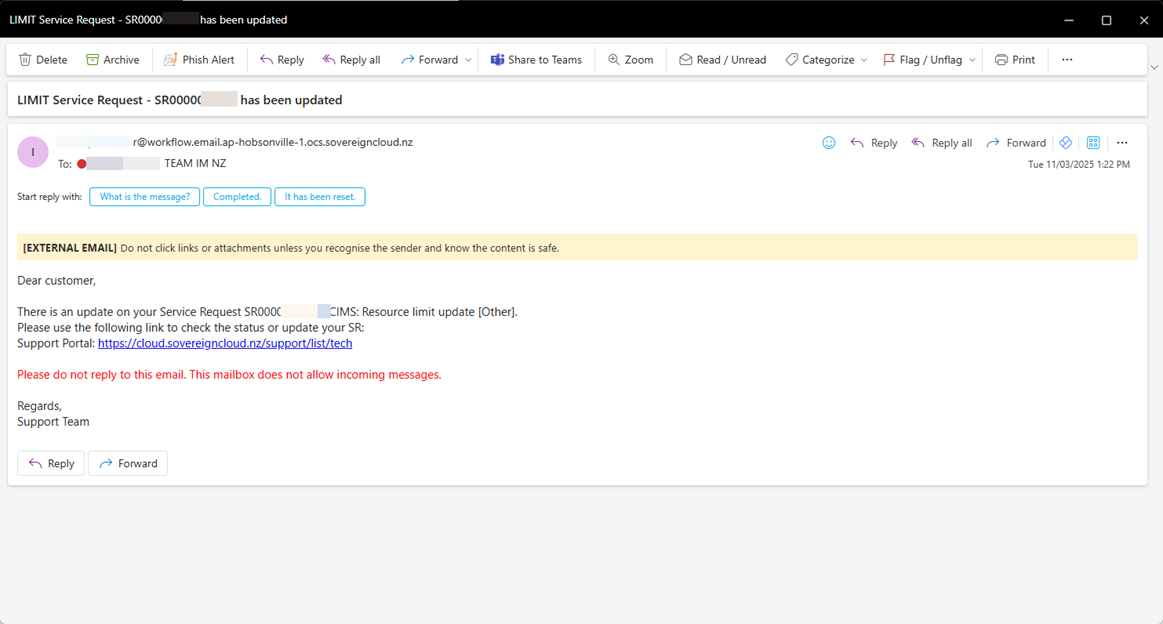
From time to time, you will also receive emails (see below) from TEAM Cloud support for related Support Requests generated in the console as and when they are updated.
TEAM Cloud provides an on shore, Wellington-based 24x7 support team offering ticket logging & triage, and escalation into Oracle Support desk & resolution service.
If the Support Management resources available in the console didn't resolve your issue and you need to talk to someone, you can contact us via the numbers below:
+64 4 830 8600 (Main)
+64 4 830 5122 (Cloud Support – 24/7)
For other Cloud enquiries, Partner requests or General enquiries you can also fill out our form here (https://info.teamcloud.nz/contact-us ) and one of our team will be in touch with you as soon as possible.
If you have any other questions, please contact info@teamcloud.nz or view our TEAM Cloud documentation here:
https://docs.teamcloud.nz/en-us/iaas/Content/home.htm
Preparing your IT Staff for TEAM Cloud
Preparing your IT staff for the adoption of TEAM Cloud involves these key steps:
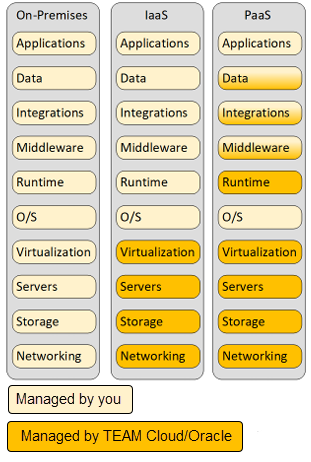
Understanding who controls what parts of your application deployment and infrastructure in the cloud
Enabling your staff to understand how their roles and tasks are likely to change
Encouraging your IT staff to develop new skills by attending training offered by Oracle and their partners.
TEAM Cloud powered by Oracle, provides a standardized and secure enterprise-grade cloud platform. While the TEAM Cloud platform hides much of the operational complexity, you have direct control over some of the components. This diagram shows you the division of responsibilities.
If you’re a subscriber of TEAM Cloud infrastructure services (IaaS/PaaS), note that TEAM Cloud/Oracle is responsible for managing the underlying infrastructure, such as the following:
Physical servers running source hypervisors or bare metal servers
Operating system running on hypervisors
Network at the hardware and operating system levels
Storage equipment and configuration
In TEAM Cloud’s PaaS database offerings, you have options ranging from fully managed (like Autonomous Database) to co-managed (like Exadata Database Service) and customer-managed databases, each with varying levels of control and management responsibility. i.e.
Fully Managed (e.g., Autonomous Database):
Oracle handles all aspects of the database, including provisioning, tuning, scaling, patching, backups and security, allowing you to focus on your application development and data analysis.
Co-Managed (e.g., Exadata Database Service):
Oracle manages the underlying infrastructure (Exadata), while you manage the database itself, including patching, tuning, backups and security. This is a pre-configured and “managed” installation of the database, with automation and configuration provided by Oracle. It is pre-configured compute and storage, with things like the storage layout designed by Oracle for optimal performance. The software installations are all automated by Oracle, and you effectively end up with a running database at the end of the installation window. You also have a GUI for on-going management tasks such as patching and backups, as well as access to a full API set for automation of database actions from scripts.
Customer-Managed (e.g., IaaS for DB):
This is just like running Oracle Database on-premises. Effectively you have a Compute VM and associated storage. You are responsible for all aspects of the database, including provisioning, infrastructure, patching, tuning, backup and security.
TEAM Cloud Shared Responsibility Model for Resiliency
Resiliency in the cloud is a shared responsibility between you (the user) and TEAM Cloud. To build resilient workloads in TEAM Cloud, you must understand your high availability (HA) and disaster recovery (DR) requirements and responsibilities. This concept is divided into two key areas:
Resiliency of the Cloud (TEAM Cloud’s Responsibility): TEAM Cloud provides a highly available, resilient cloud infrastructure based in New Zealand. This includes data centers, networks, physical hardware, and software designed to minimize downtime and keep applications operational, even in the event of failures. TEAM Cloud ensures service reliability through end-to-end service level agreements (SLAs) covering performance, availability, and manageability.
Resiliency in the Cloud (Your Responsibility): As a customer, you are responsible for implementing a business continuity plan that includes a high-availability (HA) and disaster recovery (DR) strategy, risk assessments, and incident response plans. You must architect your applications and systems for resiliency by leveraging multiple Fault Domains (FDs) and TEAM Cloud peer regions, following OCI best practices and Maximum Availability Architecture (MAA) frameworks.
TEAM Cloud responsibilities
Components | Description |
Region, Availability Domains, Fault Domains | TEAM Cloud/Oracle provisions, manages, monitors, secures, and operates a highly reliable global cloud infrastructure. |
Storage Services | TEAM Cloud/Oracle provisions and operates storage services, providing service high availability and protecting data physically within an availability domain. |
Core Networking Services | TEAM Cloud/Oracle provides high availability for OCI core networking services and connectivity services with global traffic shaping that ensures optimal application connectivity and performance. |
Database Services | TEAM Cloud/Oracle creates and initiates the Database service, conducts hardware maintenance and enhancements, updates storage servers, and oversees service health. |
Customer responsibilities
Components | Description |
HA, DR, and failover planning and testing | Plan, configure, test, and run HA, DR, and failover solutions for data and service resiliency to ensure business continuity. |
Operations and Management | You are responsible for operating and monitoring your cloud resources, implementing resilient cloud architecture best practices to minimize service disruptions. |
Workload Architecture | You are responsible for using Enterprise Architecture Best Practices and Maximum Availability Architecture (MAA) frameworks for designing, building, and maintaining reliable, secure, efficient, and cost-effective cloud workloads. |
Resiliency Planning | You are responsible for developing a comprehensive business continuity plan, including HA and DR strategy, risk assessments, and incident response plans. |
TEAM Cloud Shared Responsibility Model for Security
To securely run your workloads on TEAM Cloud Infrastructure, you must understand your security and compliance responsibilities. TEAM Cloud operates under a shared responsibility model for security.
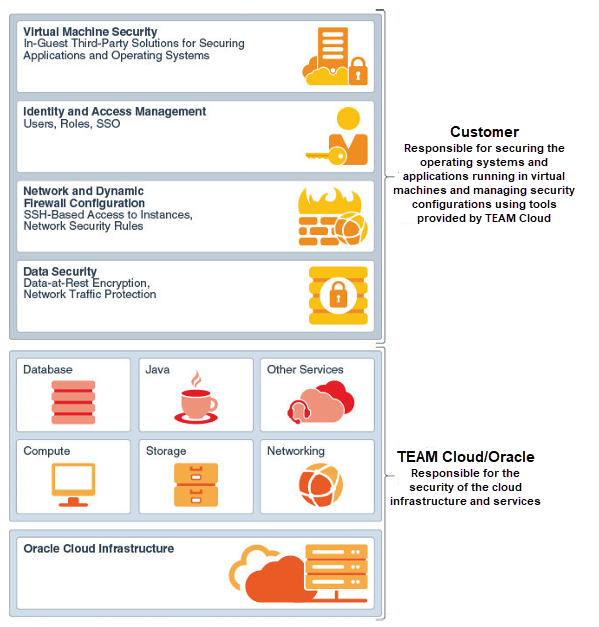
TEAM Cloud’s Responsibility – Ensuring the security of the underlying cloud infrastructure, including facilities, physical hardware, network, and virtualization layers.
Your Responsibility – Securing operating systems, applications, data (at rest and in transit), credentials (accounts, tokens, SSH keys), policies, and configurations.
While TEAM Cloud/Oracle secures the cloud infrastructure and operations, your organization is responsible for defining and enforcing its own security policies. The table and diagram below outlines the shared security model between your organization and TEAM Cloud.
Owner | Area of Responsibility |
Customer | Security in the cloud. For example:
|
TEAM Cloud/Oracle | Security of the cloud. For example:
|
TEAM Cloud Skills Readiness – Next Steps
Successful cloud adoption requires aligning people with the capabilities needed to embrace TEAM Cloud. Both IT and non-IT teams must be prepared for this transformation.
Key Steps for a smooth transition:
Training and hands-on experience in the cloud environment
Clarity on role transitions, including how existing responsibilities will adapt
A well-defined business case for adopting cloud technologies
To support this shift, consider Oracle and Oracle Partner training programs to equip teams with the necessary skills.
Refer to the table below for key courses essential to this process.
Course name | Audience (Cloud Architect, IT, Admin, Ops) | Level (Foundation, Associate, Professional, Specialist) | Source (Oracle University, MyLearn, Udemy etc..) |
Business User, Cloud Engineer | Foundation | My Learn | |
Cloud Architect, Business User, Cloud Engineer | Foundation | My Learn | |
Oracle Cloud Infrastructure 2025 Certified Foundations Associate | Business User, Security (third party) | Foundation | Oracle University |
Oracle Cloud Infrastructure 2025 Certified Architect Associate | Admin, Devs, Cloud Architect, Business User, Cloud Engineer | Associate | Oracle University |
Oracle Cloud Infrastructure 2025 Certified Architect Professional | Cloud Architect, Cloud Engineer | Professional | Oracle University |