
Core service concepts
VCN
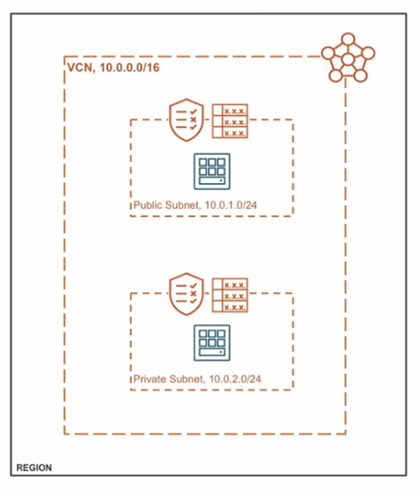
A virtual cloud network is a virtual version of a traditional network—including subnets, route tables, and gateways—on which your instances run. A cloud network resides within a single region but includes all the region's availability domains.
Instance
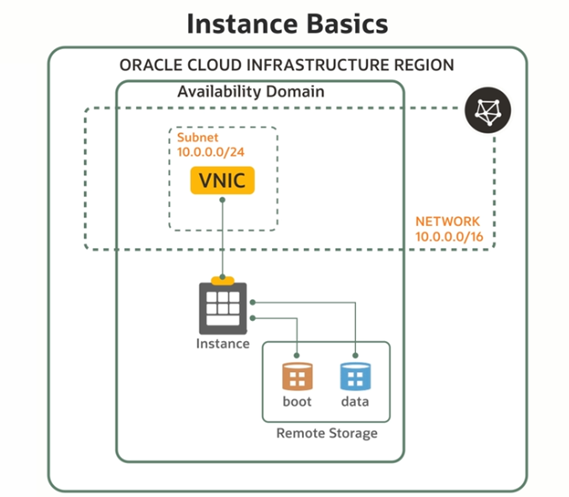
An instance is a compute host running in the cloud. The image is a template of a virtual hard drive that defines the operating system and other software for an instance, for example, Oracle Linux. When you launch an instance, you can define its characteristics by choosing its image.
In Compute, the shape specifies the number of CPUs and amount of memory allocated to the instance. TEAM Cloud Infrastructure offers shapes to fit various computing requirements
Block Volume
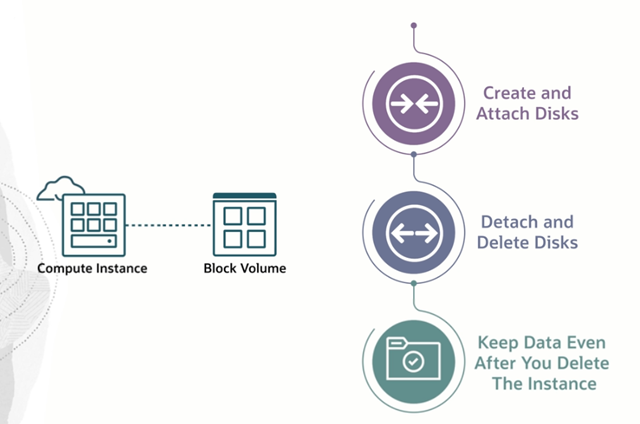
A block volume is a virtual disk that provides persistent block storage space for Oracle Cloud Infrastructure instances. Use a block volume just as you would a physical hard drive on your computer, for example, to store data and applications. You can detach a volume from one instance and attach it to another instance without loss of data.
TEAM Cloud Regions Provide High Availability & Disaster Recovery
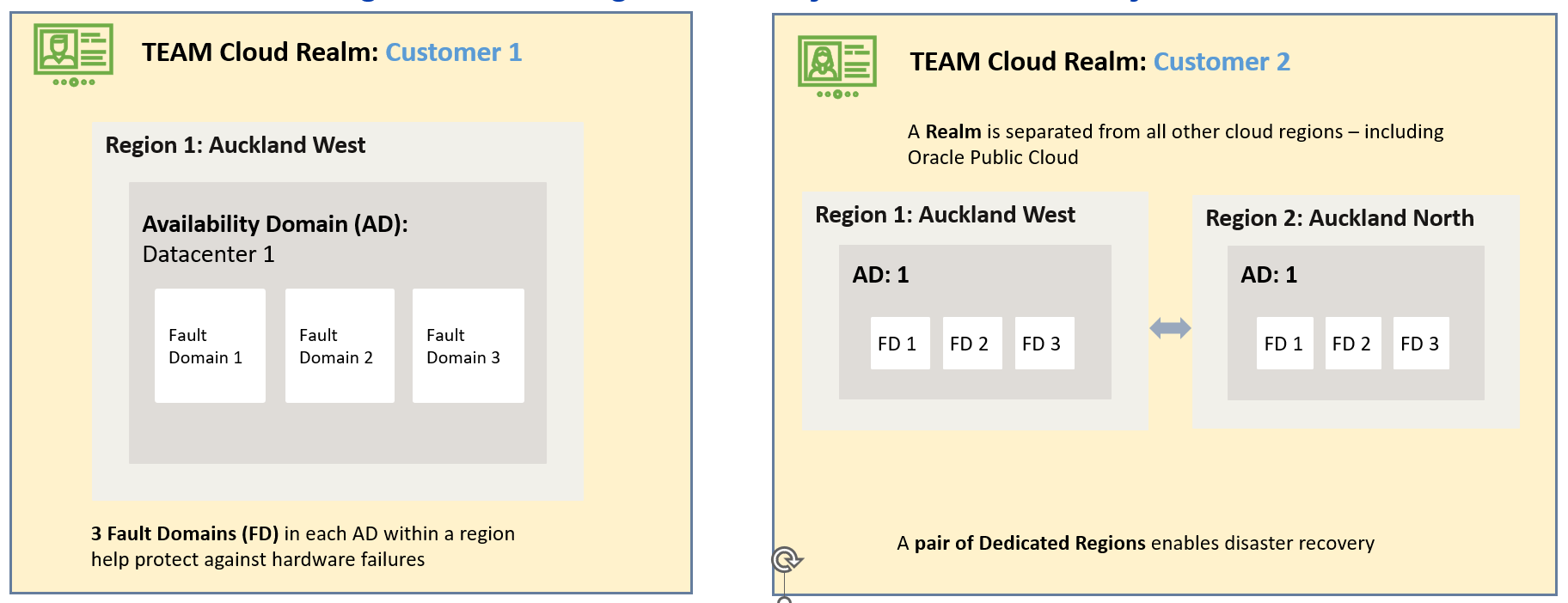
Each Availability Domain within a TEAM Cloud region offers 3 Fault Domains. Fault Domains can be used to implement high availability architectures within a Dedicated Region. Fault domains let you distribute your instances so that they are not on the same physical hardware within a single availability domain. As a result, an unexpected hardware failure or a Compute hardware maintenance that affects one fault domain does not affect instances in other fault domains. You can optionally specify the fault domain for a new instance at launch time, or you can let the system select one for you.
Disaster Recovery is aimed at protecting mission-critical applications and data in a Dedicated Region from disasters to ensure business continuity. To implement a robust DR strategy, customers can deploy at least a pair of Dedicated Regions, where one acts as a primary and the other as a DR site.
TEAM Cloud Control and Data Plane Concepts
In TEAM Cloud, there are two main areas of access: the Control Plane and the Data Plane.
Control Plane | Data Plane |
This is where you manage your cloud resources - creating, updating, or deleting things like VMs, databases, and networks. It's accessed via the TEAM Cloud Console, CLI, or APIs. Think of it as the administrative side of TEAM Cloud. | This is where actual data processing happens. It's how you interact with the resources you’ve set up, like connecting to VMs, transferring data, or running queries. It’s the operational side, handling the flow of data and workloads. |
In short: the Control Plane is for managing resources, while the Data Plane is for using them.
Connecting to TEAM Cloud (Data Plane): Key Methods Explained
There are several methods to integrate TEAM Cloud into your corporate network, each designed to meet different needs based on your connectivity requirements, security, and performance considerations:
Cloud connectivity option | Considerations | Use Case |
FastConnect: A dedicated, private connection from your on-premises data centre or other clouds directly to TEAM Cloud. |
| Ideal for businesses needing a reliable, high-performance connection for their critical workloads. |
Site-to-Site VPN: A secure IPSec VPN connection over the public internet from your on-premises network to TEAM Cloud.
|
|
|
Public Internet: Direct access to OCI services over the internet using HTTPS or other protocols. |
|
|
Summary:
Performance Needs: Choose FastConnect for high bandwidth and low latency requirements.
Security Requirements: IPSec VPN offers secure, encrypted connections, while FastConnect provides private, dedicated links.
Cost Factors: IPSec VPN and internet access are generally more cost-effective, while FastConnect provides premium performance at a higher cost.
Migrating Data to TEAM Cloud: Key Methods and Tools
When it comes to migrating data to TEAM Cloud there are several methods and tools at our disposal based on your existing environment and migration needs, whether you’re moving databases, entire workloads, or massive datasets:
Migration tools/services | Considerations |
Oracle Cloud VMware Solution (OCVS): Allows you to easily move your entire VMware environment to TEAM Cloud without making any changes to your existing VMware tools or processes. | Best for companies already using VMware who want to quickly lift and shift their workloads to the cloud without re-architecting. |
Oracle Cloud Migrations (OCI Migration Service): Oracle’s built-in tool for migrating applications and data to TEAM Cloud. It automates many of the tasks involved in the migration process, making it easy and efficient. |
|
Oracle Database Migration Tools: Oracle Zero Downtime Migration (ZDM): This tool allows you to migrate your Oracle Databases to TEAM Cloud with minimal or no downtime. Oracle Data Pump: Ideal for moving smaller datasets and databases using export/import functionality. Golden Gate: Supports zero downtime migrations by capturing and applying changed data. Data Guard: Designed for high availability and disaster recovery, but it can also be used to migrate databases. A standby database that continuously synchronizes with your primary database and lets you move to TEAM Cloud without taking DB’s offline for long periods, ensuring business continuity during the transition. | Best for database migrations, particularly for mission-critical databases where minimizing downtime is key. A complete overview of migration solutions, tools, and resources can be found here: Migrate Oracle Databases to OCI | Oracle |
Block Volume and Object Storage You can also move data to TEAM Cloud by directly uploading to Object Storage or by attaching Block Volumes. | Simple data migrations where you don’t need specialized migration tools. Utilize tools such as Rclone to migrate data into Object storage – review the related links at the end of the page for more great resources. |
Third-Party Tools Oracle partners with several third-party migration tools (like ZConverter, Rackware, Platespin etc.) that help with VM and data migration. | Organizations with specific migration needs or those using non-Oracle environments. |
Further reading
Cloud Adoption Framework and Essentials
Oracle Cloud Infrastructure 2025 Certified Foundations Associate